Description/Symptoms of Issue:
This notification indicates that the Main CPU is experiencing poor communication with the Gripper CPU.
Cause:
A gripper communication failure can be caused by any of the following:
1. Misaligned or overpacked bin.
2. The brush inside the lift brush guide may be dirty or jammed.
3. A broken copper tape inside strip sensorhouse.
4. Loose/bad connection on cable between robot CPU and gripper CPU card
Solution:
1. The most common cause of this issue is a misaligned or overpacked bin. Inspect the bin on which the error occurred.
2. If the bin was not the cause, the brush inside the lift brush guide may dirty or getting jammed.
a. To check, remove the Brush Kit (AS-35052).
b. Put the brush inside the brush guide (black plastic tube) and hold and push on the brush as shown in the photo below.
c. Feel for any additional resistance besides the force of the spring.
d. Hold and push in the opposite direction. The spring should push the brush out very easily.
e. If not, inspect the assembly for the cause of the resistance (ex. sharp edges on brush or inside plastic tube, dirt, etc.).

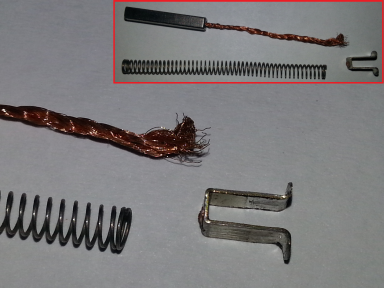
3. Another possible cause is a broken copper tape inside strip sensorhouse
a. Ensure that the copper tape inside the Strip Sensorhouse is not damaged (look for broken fibers) or crushed. Copper tape should be placed like the picture below.
b. Take the Strip Fasten out from the Sensorhouse and look at it closely.
c. Use the procedure for removing and installation of Sensorhouse. Focus only on the steps related to getting the Strip Fasten out and putting it inside the Sensorhouse.
d. It is not necessary to disconnect the PCB cable.

4. Another possible cause is a Loose/bad connection on cable between robot CPU and gripper CPU card
a. Check the connections on the Gripper CPU (AS-35006)

b. Check the connections on the CPU Board (AS-35018)

c. Check for crushed bootlace - ferrules on Cablekit Stripshaft (AS-35054) - usually end of cable connected to Strip Shaft Assembly (AS-35025)

d. Check if the copper cable inside the spring is severed or broken/has damaged fibers
Was this article helpful?
That’s Great!
Thank you for your feedback
Sorry! We couldn't be helpful
Thank you for your feedback
Feedback sent
We appreciate your effort and will try to fix the article